Job management for UK trades

Run your trade business from your pocket.

Jobs, quotes, invoices, hours, holidays and materials ordering, all in one app. Know what every job is making, get paid sooner and stop overpaying for materials.

No card needed · Works on phone, tablet and computer
Built by a working electricianVAT at 20%, 5% and reverse chargeUK bank holidays built inYour data stored in the UK
Features

Everything a trade business runs on, in one place

No more spreadsheets, paper timesheets and notes on the back of a cable box.

Your day at a glance

Open the app and know exactly where you stand

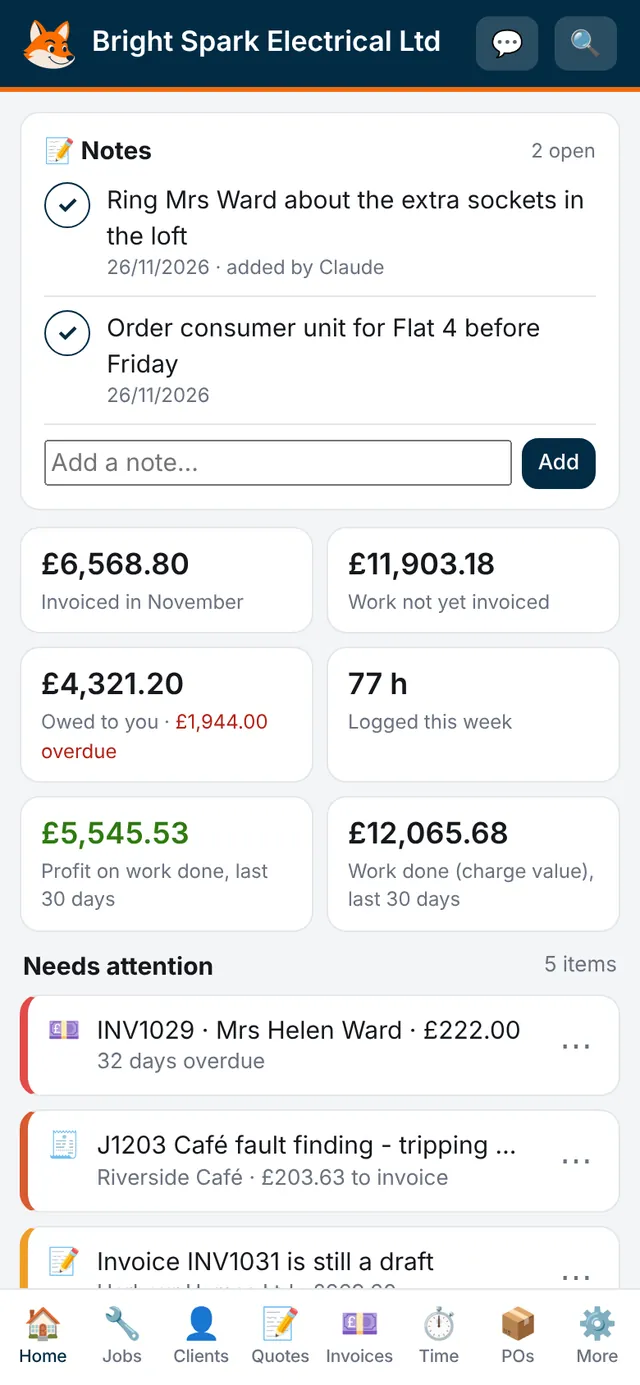
The home screen shows what you've invoiced this month, what you're owed, work done but not yet invoiced, and your profit, before you've had your first brew.

  • Overdue invoices, unsent quotes and jobs ready to bill flagged under Needs attention
  • Snooze a reminder for a day or a week, or dismiss it
  • Quick notes at the top so nothing gets forgotten
ToolFox home screen with money owed, profit and items needing attention
The home screen: money, profit and what needs chasing
Jobs

See the profit on every job as you go

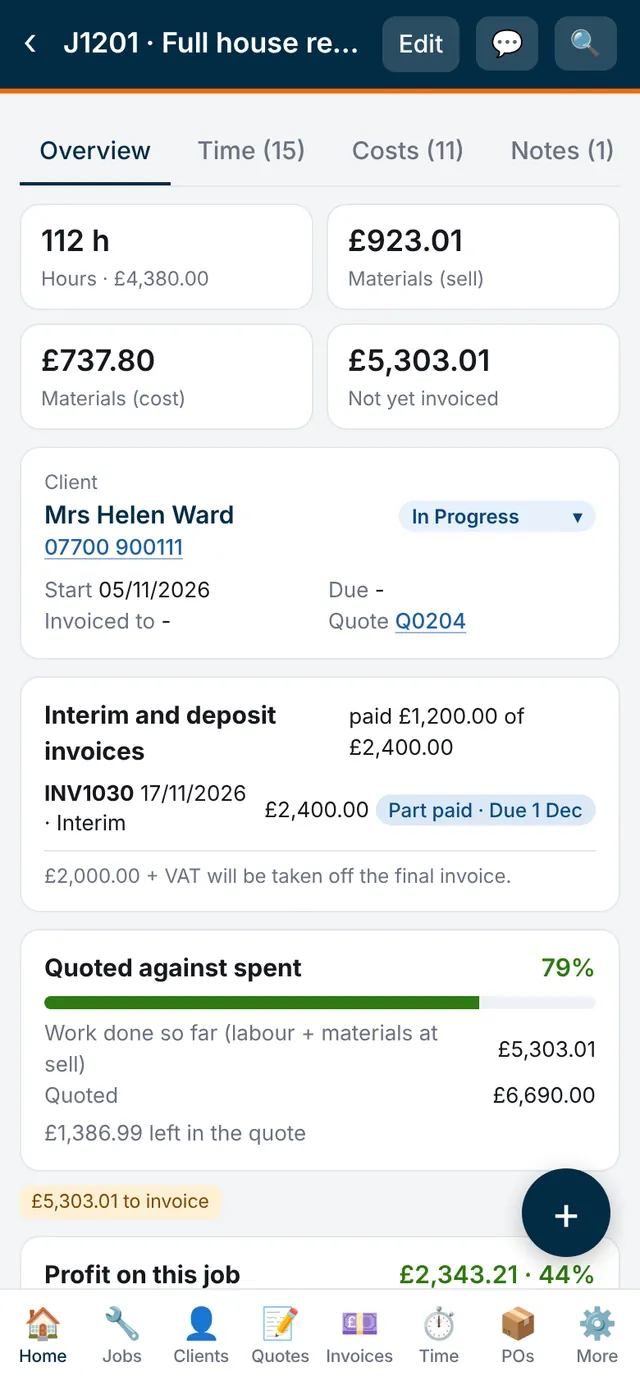
Hours, materials and costs land on the job as they happen. ToolFox compares them with what you quoted, so you know whether a job is making money while you can still do something about it.

  • Labour and materials at cost and at sell price
  • "Quoted against spent" bar on every quoted job
  • Interim and deposit invoices taken off the final bill automatically
A job showing hours, materials, money not yet invoiced and profit
A job with its hours, materials and profit
Quotes & invoices

Invoice in a few taps, on letterhead you'll be proud of

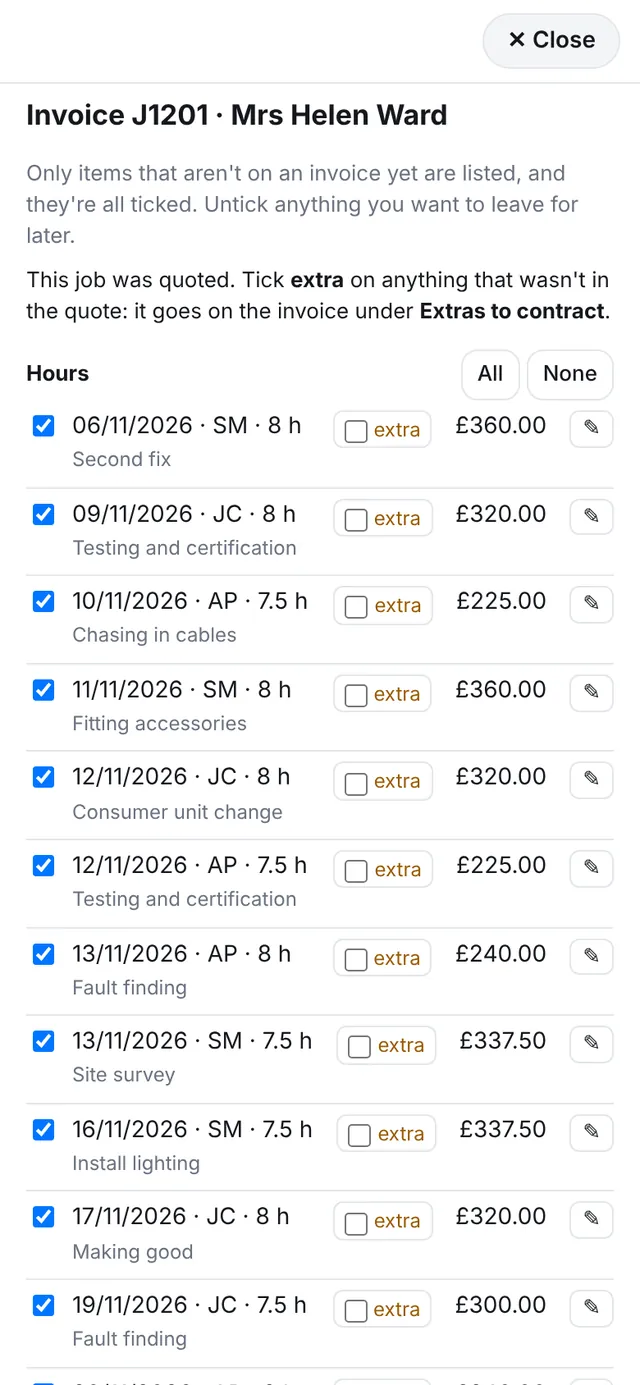
Open a job, tick the hours and materials to bill, and ToolFox builds the invoice. Anything not on the original quote can be marked as an extra so the customer sees exactly what changed.

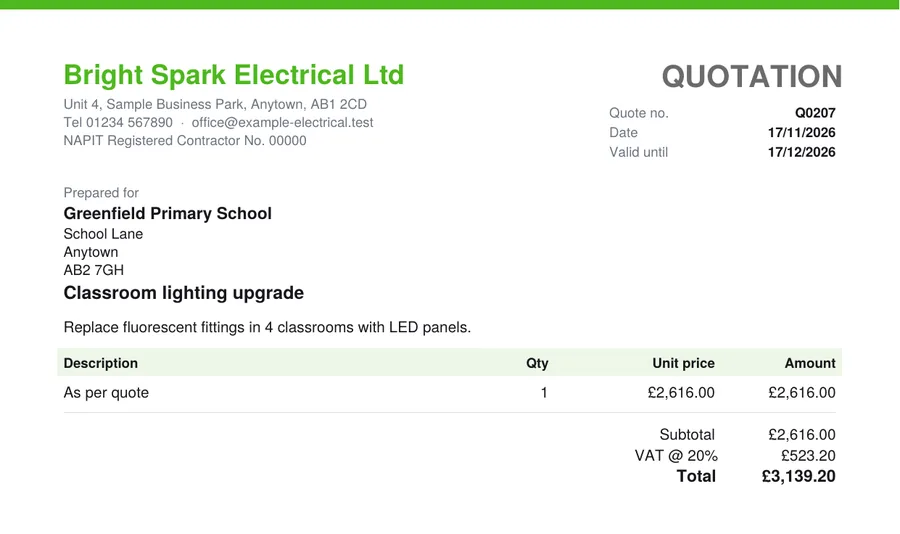
  • Quotes and estimates with your logo, sent as PDFs
  • Accepted quotes turn into jobs
  • Part payments, money owed and overdue tracking
Picking the hours and materials to put on an invoice
Pick what goes on the invoice; mark extras
A ToolFox quotation PDF
Your quotes and invoices go out as tidy, branded PDFs
Save on every order
Materials ordering

Ask several suppliers for prices, then split the order

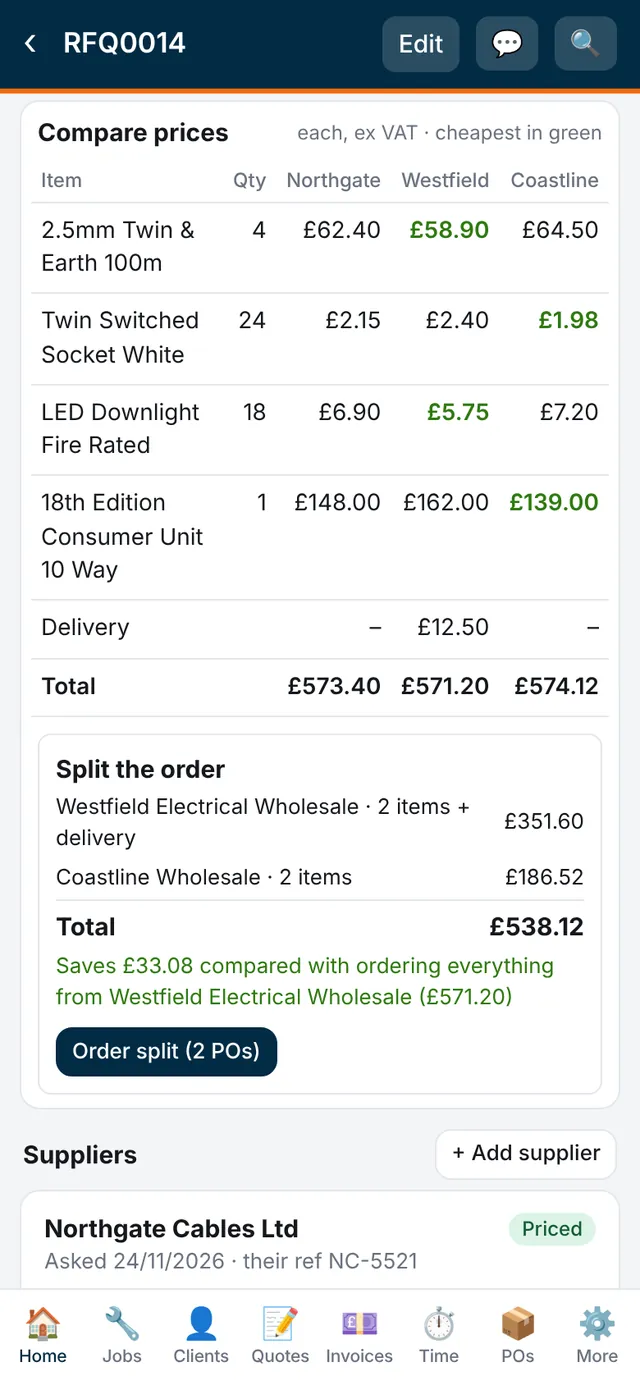
Type your materials list once and send it to as many wholesalers as you like. When their prices come back, ToolFox lines them up side by side with the cheapest in green.

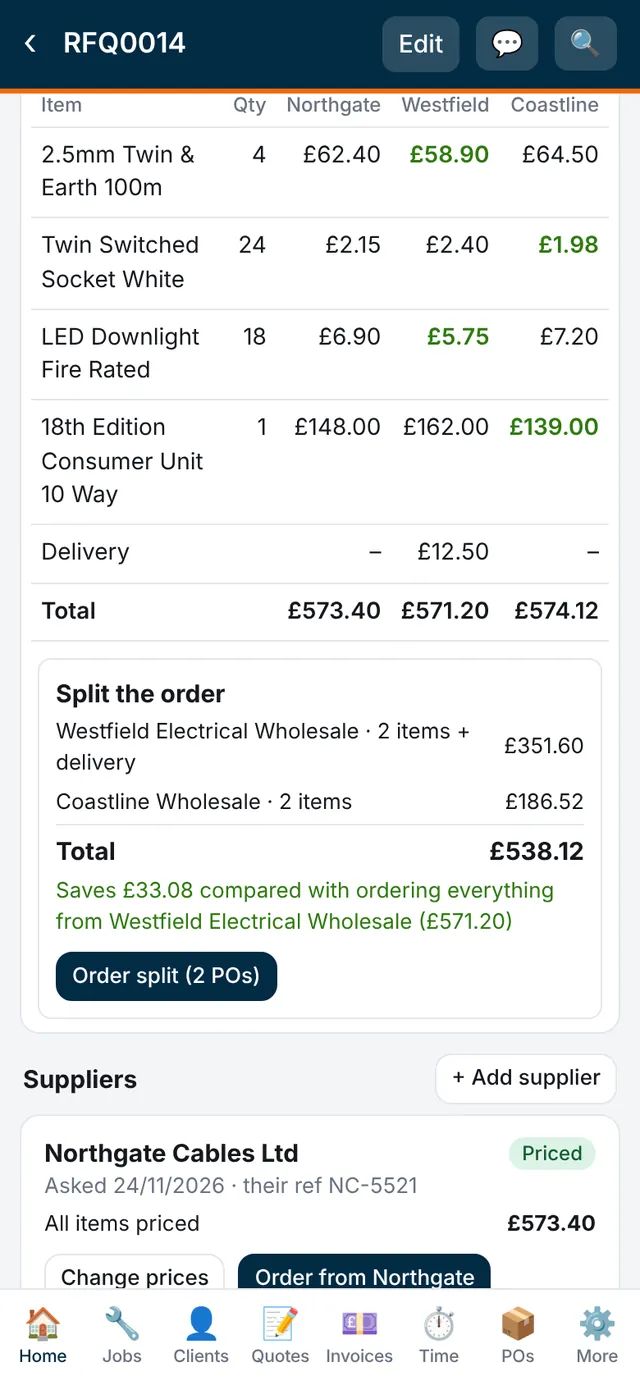
Then buy each item from whoever is cheapest. ToolFox works out the split, shows what you save and makes a purchase order for each supplier.

In this example, splitting saves £33.08 on one order
  • Prices typed in, or read straight from the supplier's PDF quote by AI
  • Flags prices that look like a different unit, e.g. per metre against per coil
  • Purchase orders linked to the job, so materials land on its costs when they arrive
Three suppliers' prices compared side by side
Three wholesalers' prices side by side
Splitting an order between suppliers to save money
Split the order and see the saving
AI that saves typing

Snap a supplier's quote. Get a purchase order.

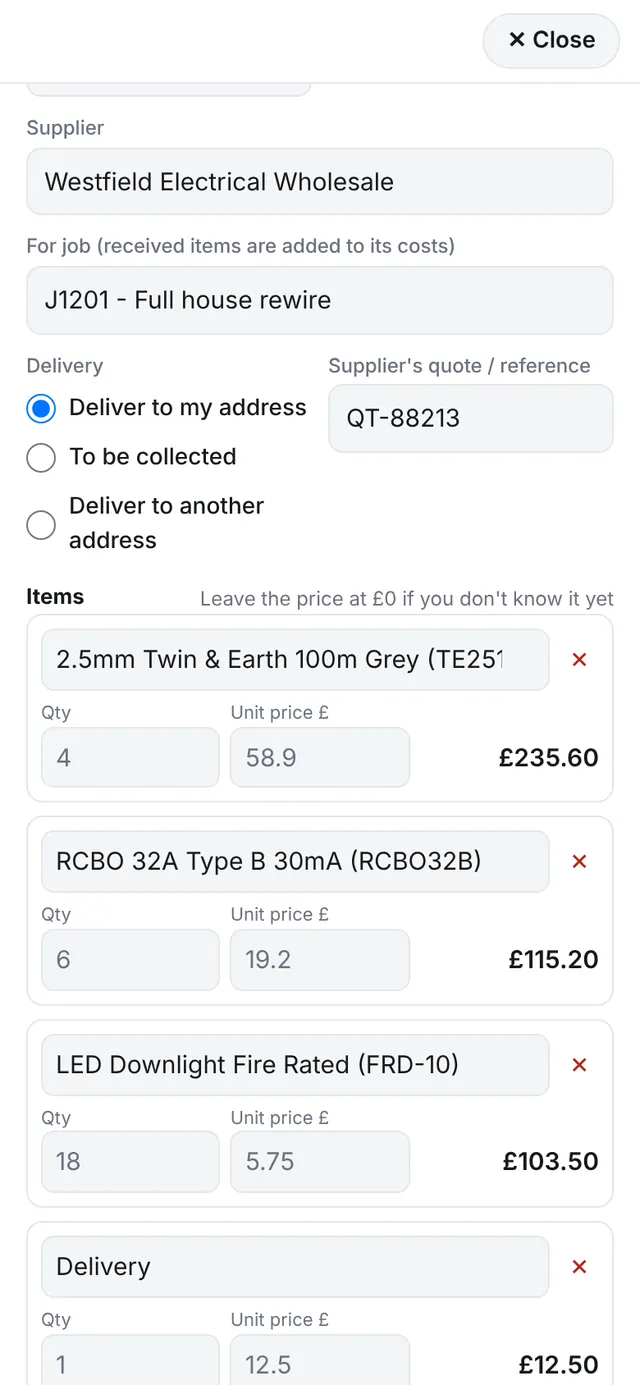
Got a quote from a wholesaler as a PDF or on paper? Give it to ToolFox and it reads the supplier, their reference, every item and price, and even works out which job it's for. You check it, then send.

  • Works with PDFs and photos
  • Reads handwritten materials lists onto a job too
  • AI is included; there's nothing extra to set up
A purchase order filled in from a supplier's quote
A purchase order filled in from a wholesaler's quote
Timesheets, holidays & payroll

Hours, mileage and holidays sorted, without the paperwork

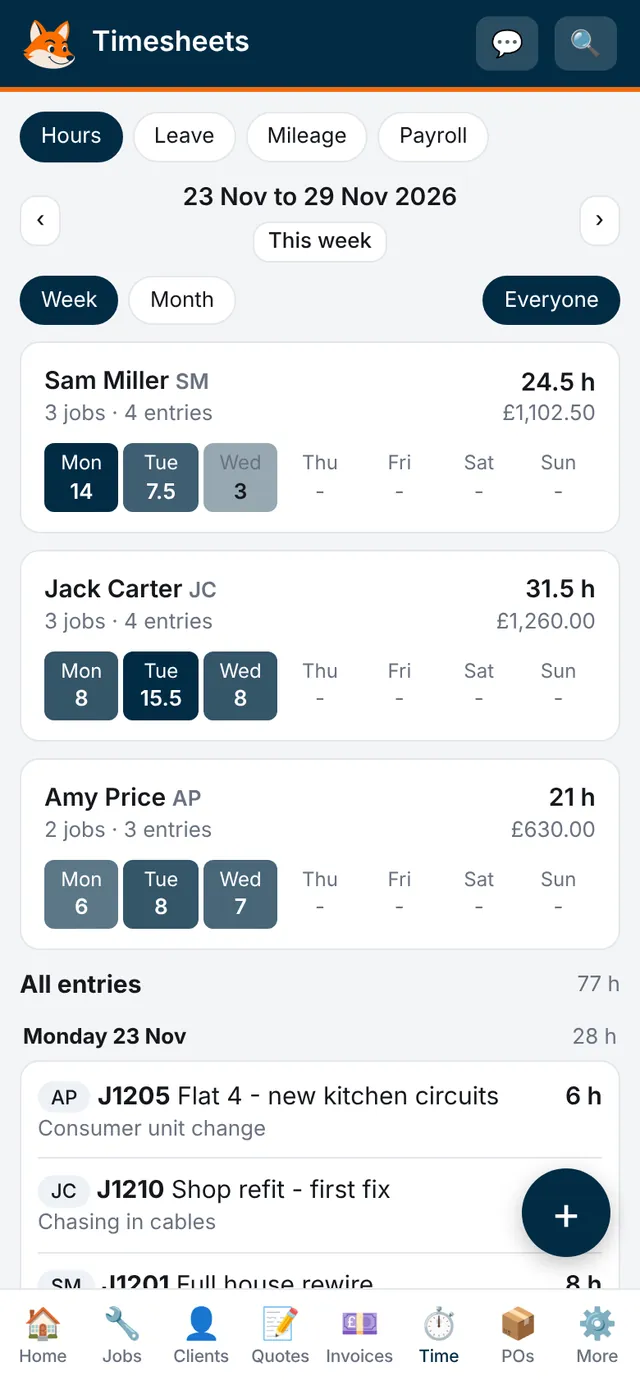
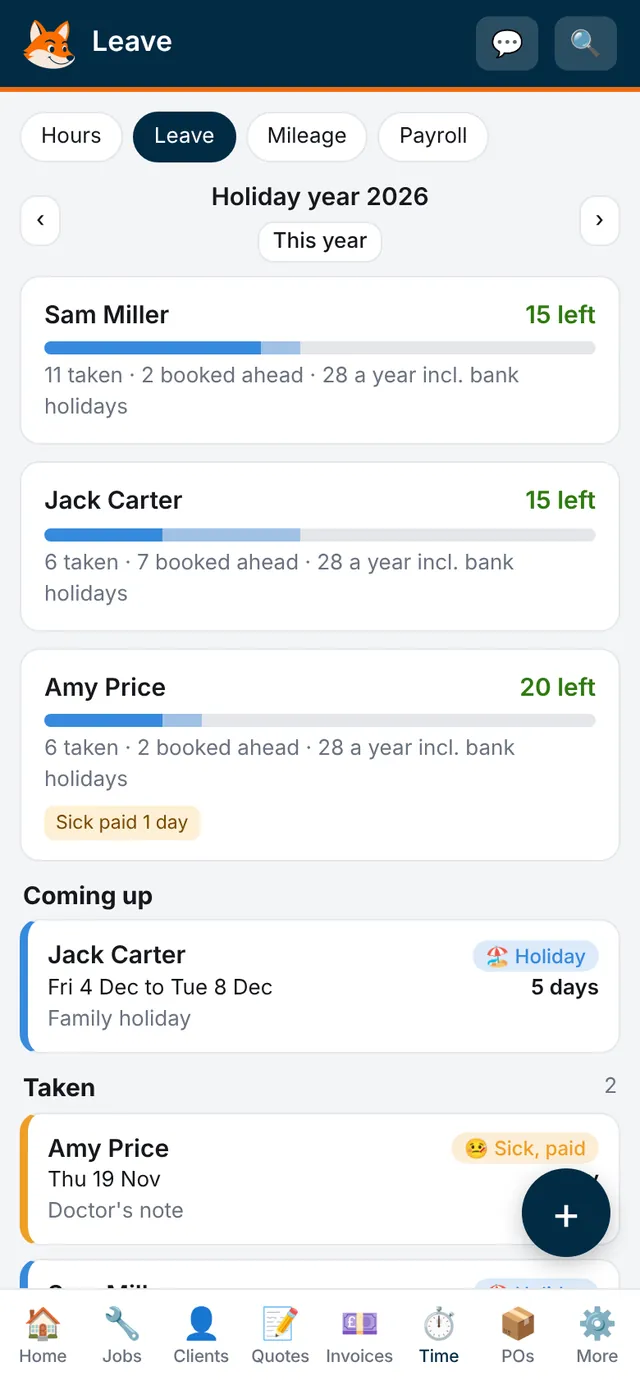
Your team logs their hours against jobs from their phones. Holidays are requested in the app and approved by you, and allowances work themselves out, including bank holidays.

  • Weekly timesheets per person, with gaps flagged
  • Holiday requests, sickness and allowances
  • Mileage and monthly payroll summaries on your own pay periods
Weekly timesheets for each member of staff
Everyone's hours for the week
Holiday allowances and booked leave for each person
Holiday allowances, requests and sickness
Your team

Give your staff the app, not your prices

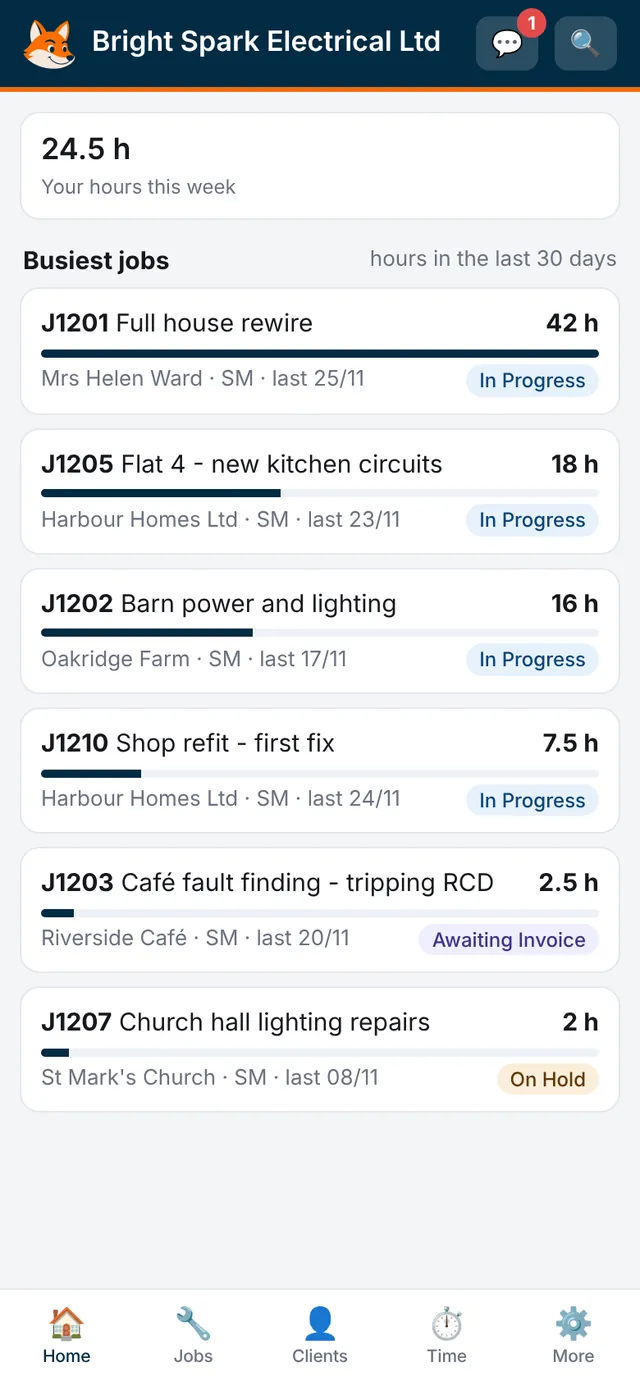
Staff see their jobs, log their own hours and request holidays. They never see what you charge, your margins, invoices or other people's hours. That's protected in the database itself, not just hidden on screen.

  • Owner, admin and staff roles
  • Built-in messaging, with chats linked to jobs and photos
  • Invite your team by link in seconds
What a staff member sees: their hours and jobs, no money
A staff member's view: their jobs and hours, no money
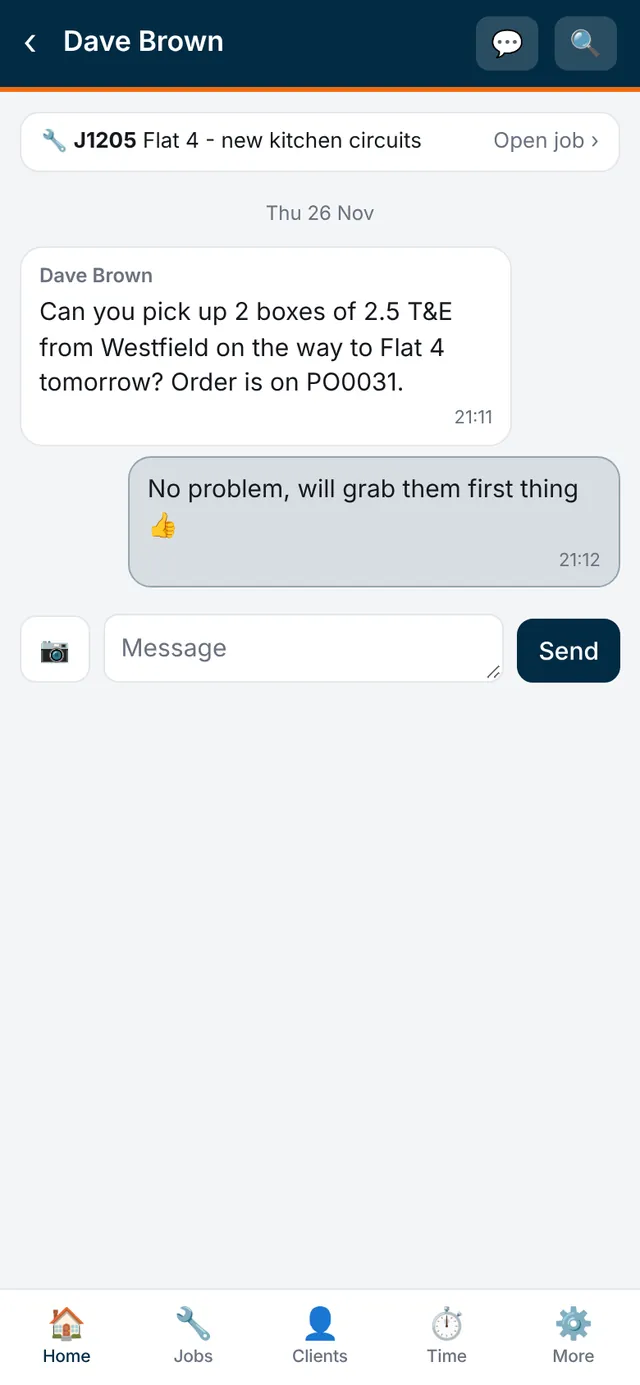
A message thread about a job between the owner and a staff member
Messages linked to the job they're about
And there's more

The bits that usually live in a drawer

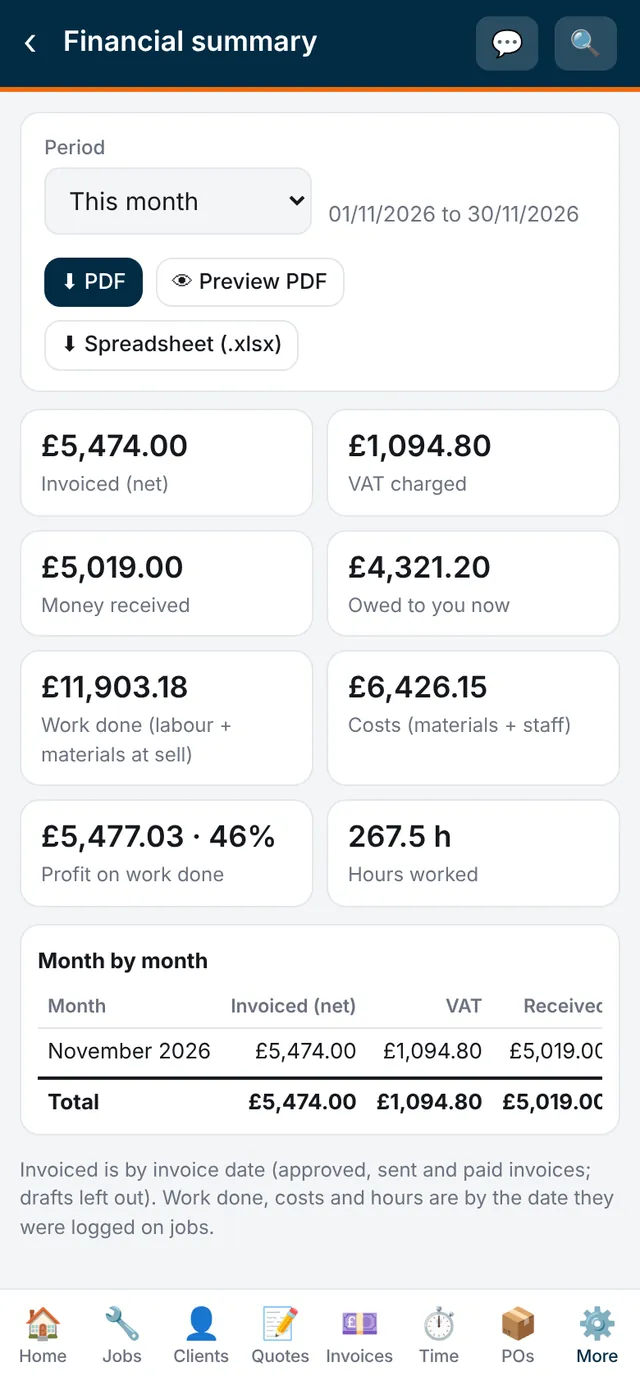
Financial summary report

Reports for you and your accountant

Profit, VAT, money owed, client spend and staff hours. Download as PDF or spreadsheet.

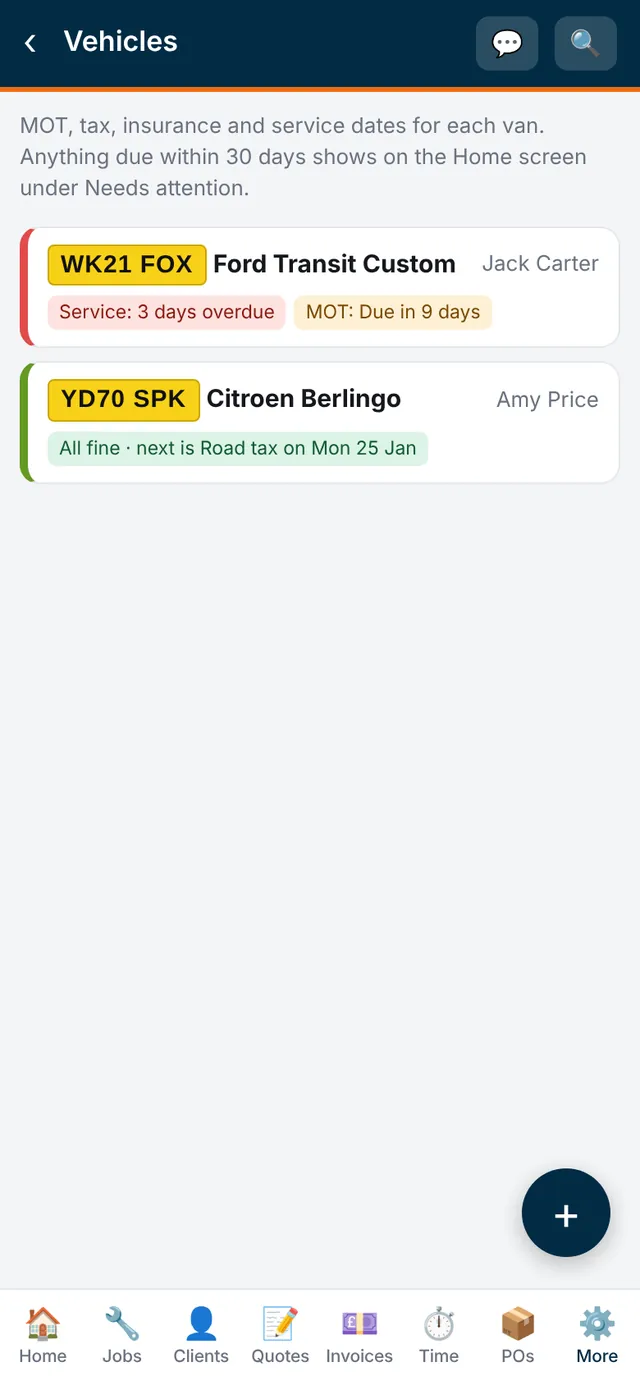
Van MOT, tax and insurance reminders

Van reminders

MOT, tax, insurance and service dates for every van, flagged before they're due.

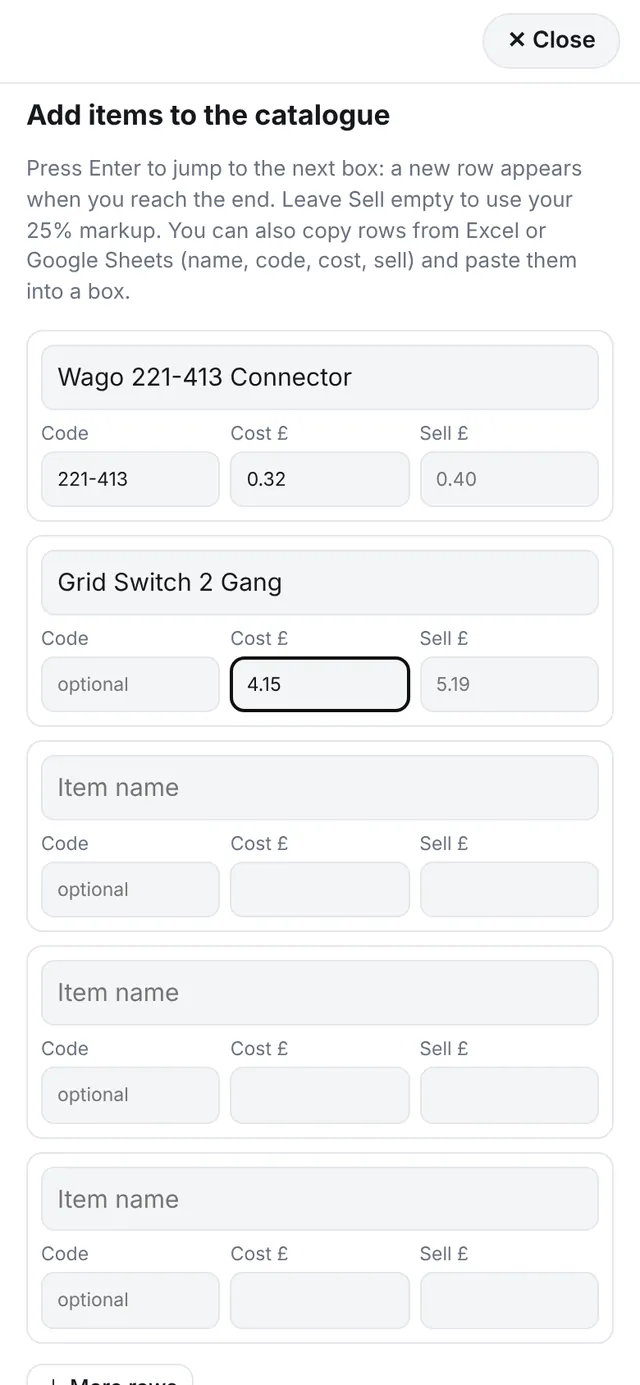
Adding items to the materials price list

Your price list

Type items quickly, paste from a spreadsheet, or import a wholesaler's price file to update every price at once.

Switching is easy

Bring your data with you

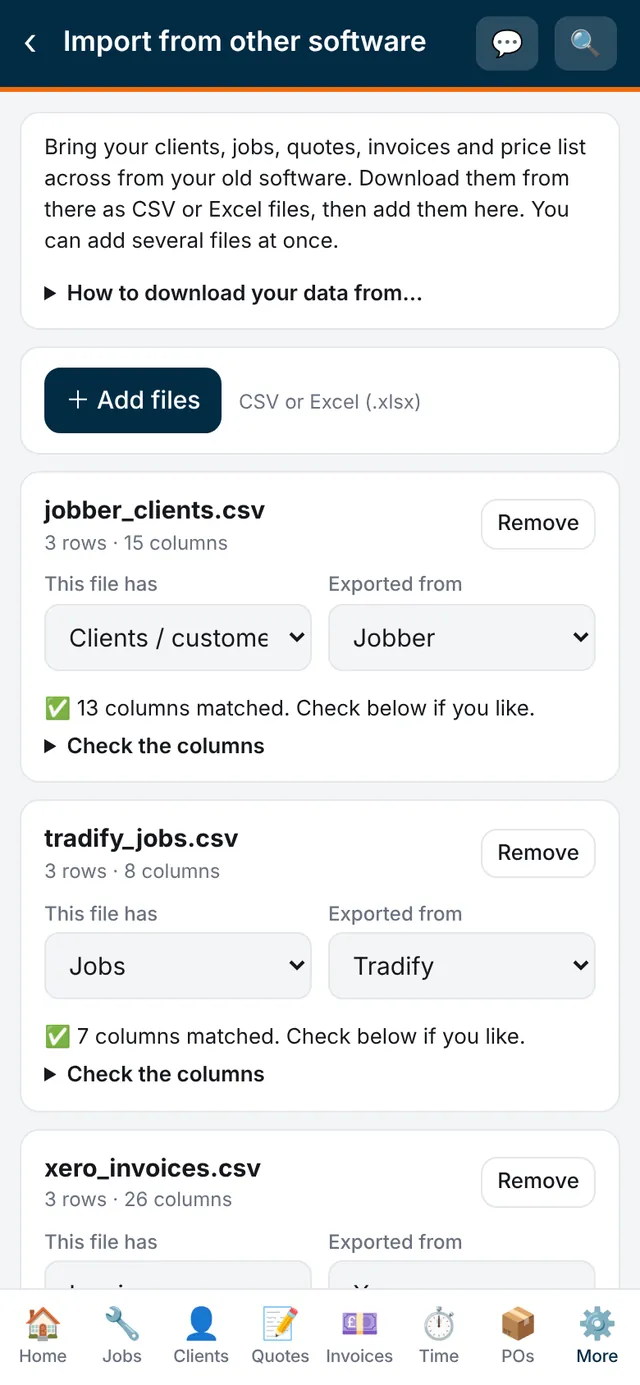
Moving from Tradify, Jobber, ServiceM8, simPRO, Fergus, QuickBooks, Xero or a spreadsheet? Download your data as CSV or Excel files and add them to ToolFox. It works out which column is which, shows you a preview, and brings your clients, jobs, quotes and invoices across.

  • Done yourself, in minutes, at no extra cost
  • Duplicates spotted and skipped
  • Changed your mind? Undo the whole import with one tap
Importing client, job and invoice files from other software
Files from other software, matched automatically
Why ToolFox

Made by someone who does the job

ToolFox was built by an electrician running his own business, to fix the things that cost trades time and money every week.

💷

Pay less for materials

Get prices from several suppliers in one go, compare them properly and split the order to save money every time you buy.

🤖

AI that does the typing

Supplier quotes, photos of materials lists and files from other software are read for you. You just check and confirm.

📈

Know your profit, job by job

Live costs against your quote, so you spot a job going wrong while you can still fix it, not when the bank statement arrives.

🔒

Staff in, prices out

Your team gets what they need and nothing more. Prices, invoices and other people's hours stay with you.

🇬🇧

Made for UK trades

VAT at 20% and 5%, reverse charge, UK bank holidays, pay periods that fit how you pay your team, and UK data storage.

📱

Simple on a phone

Big buttons, plain English and everything a tap or two away. Add it to your home screen and it works like an app.

Pricing

Try everything free for 30 days

Every feature, for you and your whole team. No card needed to start.

30-day free trial

Monthly plans coming soon
  • Jobs, quotes and invoices
  • Timesheets, holidays and mileage
  • Supplier price requests and split orders
  • Purchase orders
  • AI reading of quotes and lists
  • Team roles and messaging
  • Reports, PDF and spreadsheet
  • Import from your old software
Start your free trial
Questions

Good to know

Do I need to install anything?

No. ToolFox runs in your web browser on any phone, tablet or computer. On your phone you can add it to your home screen so it opens like any other app.

Can my staff use it?

Yes. Invite them with a link. Staff can log their hours, see their jobs, request holidays and message you, but they can't see prices, invoices or other people's hours.

Can I bring my data from my current software?

Yes. Export your clients, jobs, quotes, invoices and price list as CSV or Excel files from your current system and import them into ToolFox. It recognises files from the most popular job management and accounting packages, and you can undo an import if anything isn't right.

Where is my data kept?

Your data is stored on secure servers in London. Each business can only ever see its own records, and staff permissions are enforced by the database, not just the screen.

Does the AI cost extra?

No. Reading supplier quotes, photos of materials lists and import files is included.

What happens after the free trial?

Monthly plans are coming soon. Nothing is ever charged automatically: you only pay if you choose a plan.
Spend less time on paperwork and more on the tools

Set up in minutes. Try every feature free for 30 days.

Start your free trial